ActiveMQ: Bridging Topics to Queues
Table of Contents
Most recently, I had the need to create a bridge from Topics to Queues in order to create stateless services. The goal was to adopt a model where messages can be processed in parallel. Essentially, I wanted to configure the following (in the message broker):
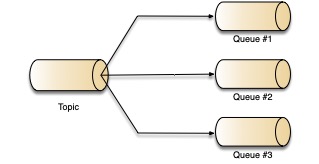
While there are many other ways to do this, I wanted to experiment with ActiveMQ to support this setup. The following is how I configured it locally (in my dev box):
Use a Docker Image
I used an ActiveMQ docker image found here. It was pretty straightforward and was able to get it running after a few commands. Here is what I did to define a baseline (this is from the instructions in the link above):
{% highlight shell %}
docker run –user root –rm -ti
-v /Users/alberto/workspace/docker/activemq/conf:/mnt/conf
-v /Users/alberto/workspace/docker/activemq/data:/mnt/data
rmohr/activemq:5.15.4-alpine /bin/sh
{% endhighlight %}
Notice the following:
- I created the
/confand/datadirectory in my dev box. - I mounted these folders into the
/mnt/*respective to my local box. - As the end of this command, a shell will be started inside the docker container
Then, I had to do the following (within the docker container):
{% highlight shell %} chown activemq:activemq /mnt/conf chown activemq:activemq /mnt/data cp -a /opt/activemq/conf/* /mnt/conf/ cp -a /opt/activemq/data/* /mnt/data/ exit {% endhighlight %}
Now, I have the configuration in my conf folder.
Configure ActiveMQ
Now that I have a mounted folder to the docker container (within the conf folder), I can edit the activemq.xml file so that the following is included in the virtualDestinations section:
{% highlight xml linenos %}
The important lines here are the section where the compositeTopic is configured to forward messages to the queue. For a full example of the activemq.xml file, please find it here.
Test: Send A Message Forward
You can now go to the admin console at:
http://localhost:8161/admin/send.jsp
and send a message to the topic. You will see messages forwarded to the queues of your choice.